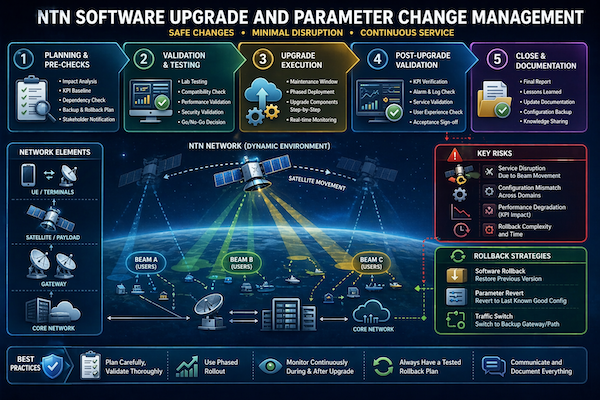
- Introduction to NTN Software Upgrade and Change Management
In Non Terrestrial Networks (NTN), software upgrades and parameter change Management are high impact operations due to the dynamic nature of satellites and beam based coverage. Unlike terrestrial networks, a single change can affect large geographical areas instantly.
- Impacts multiple beams and users simultaneously
- Requires coordination across satellite, gateway, RAN, and core
- Must consider satellite movement and timing
Key objective: Execute upgrades and changes with zero or minimal service disruption.
- Why Upgrade and Change Management is Critical in NTN
Frequent upgrades and parameter tuning are necessary for:
- Feature enhancements (3GPP releases)
- Performance improvements
- Security patches
- Bug fixes
Risk factor:
- Any mistake can lead to widespread service outage due to shared satellite resources
- Types of Changes in NTN Networks
Changes in NTN can be broadly categorized as:
- Software upgrades (satellite payload, gateway, RAN, core)
- Parameter tuning (beam, scheduling, power control)
- Configuration updates (routing, handover, slicing)
| Change Type | Scope | Risk Level |
|---|---|---|
| Software Upgrade | System wide | High |
| Parameter Change | Beam / region | Medium |
| Configuration Update | Specific functions | Low to Medium |
Practical insight:
- Even small parameter changes can have large scale effects in NTN
- NTN Upgrade Workflow (Step-by-Step)
A structured workflow is essential for safe upgrades.
- Pre checks and impact analysis
- Lab validation and testing
- Maintenance window planning
- Upgrade execution
- Post validation
Key principle:
- Never perform direct upgrades on live network without prior validation
- Pre Upgrade Planning and Validation
Before executing any upgrade:
- Analyze impact on services and users
- Validate software in lab environment
- Check compatibility with existing systems
- Prepare rollback plan
Checklist:
- KPI baseline captured
- Backup of configurations taken
- Dependencies identified
Goal:
- Eliminate unknown risks before deployment
- Maintenance Window Planning in NTN
Timing is critical due to satellite movement.
- Choose low traffic periods
- Align with satellite visibility and beam schedule
- Inform stakeholders and customers
Challenges:
- Limited maintenance windows due to continuous coverage
- Beam movement may shift load during upgrade
Best practice:
- Plan upgrades per region or beam cluster

- Upgrade Execution Process
During execution:
- Apply upgrade in controlled sequence
- Monitor real time KPIs and alarms
- Keep rollback option ready
Execution steps:
- Upgrade gateway systems
- Update RAN parameters
- Validate satellite interaction
- Confirm core connectivity
Important:
- Avoid simultaneous upgrades across all domains
- Risk Management in NTN Upgrades
Risk management is more complex due to dynamic network behavior.
Key risks:
- Beam movement causing unexpected load shifts
- Synchronization loss between satellite and ground
- Service interruption due to configuration mismatch
Mitigation strategies:
- Gradual rollout (phased deployment)
- Real time monitoring during upgrade
- Backup configurations ready
Practical insight:
- Always consider how beam movement will impact traffic distribution
- Impact of Beam Movement on Changes
Beam movement introduces unique risks.
- Traffic shifts between beams dynamically
- Changes may affect users moving across beams
- Load balancing behavior may change
Example:
- Parameter tuned for one beam may not work for another after movement
Key takeaway:
- Changes must be validated across multiple beam scenarios
- Rollback Strategies in NTN
Rollback is critical in case of failure.
- Restore previous software version
- Revert parameter configurations
- Switch traffic to backup systems
| Scenario | Rollback Action |
|---|---|
| Software failure | Downgrade to previous version |
| KPI degradation | Revert parameter changes |
| Gateway issue | Switch to backup gateway |
Best practice:
- Always test rollback procedure before upgrade
- Post Upgrade Validation and Monitoring
After upgrade completion:
- Compare KPIs (before vs after)
- Monitor alarms and logs
- Validate user experience
Key KPIs:
- Access success rate
- Throughput
- Latency
- Stability
Goal:
- Ensure no hidden issues remain after upgrade
- Common Issues During NTN Upgrades
- Configuration mismatch across domains
- Unexpected KPI degradation
- Synchronization issues
- Compatibility problems between vendors
Lesson:
- Most issues arise due to incomplete validation or coordination gaps
- Key Takeaways for Engineers
- NTN upgrades must be carefully planned and phased
- Risk management is critical due to large impact scope
- Beam movement must always be considered
- Rollback strategy is mandatory before execution
- Continuous monitoring ensures successful upgrade completion